CyboPal ONE: World's First Desktop Robot Terminal Raises $1.2M on Kickstarter
Campaign Teardown · · PledgeRadar Editorial
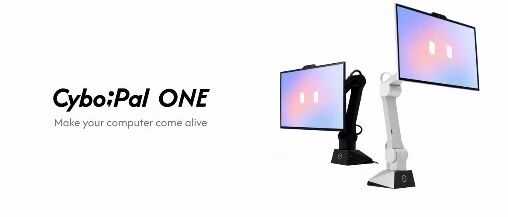
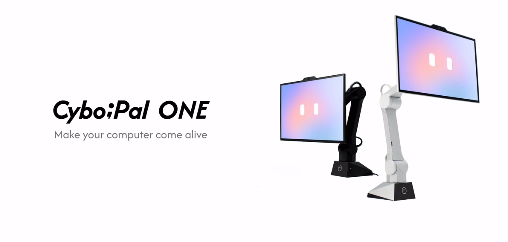
The CyboPal ONE is a desktop robot terminal that integrates a 27-inch 4K display, a six-degree-of-freedom (6-DOF) robotic arm, and a local AI computing platform. Utilizing visual tracking, spatial awareness, and voice/gesture control, the display actively adapts to the user's position and operations. It targets programmers, designers, remote workers, and high-end desktop users.
Campaign Launch and Early Performance
The CyboPal ONE launched on September 22, 2026, with a planned end date of November 21. In just two weeks, it secured over $1.2 million. While its backer count isn't exceptionally high compared to typical monitor crowdfunding campaigns, the product's premium price point enabled it to quickly surpass the million-dollar funding mark.
Pricing for the Super Early Bird tier was set at $1,599, with an exclusive $1,499 price available to those who paid a $30 deposit before the campaign. The planned retail price is $2,499. Prior to launch, the project garnered over 6,000 followers. The brand generated buzz through live demonstrations at CES 2026, pre-orders, live stream presentations, and limited-time early bird discounts. For a product largely unseen by consumers, the robotic arm's ability to autonomously move the entire display served as compelling visual content for promotion.
The device has been showcased at major exhibitions like CES, AWE, and IFA, with several tech creators providing hands-on experiences. However, public demonstrations have primarily focused on mechanical movement, gesture response, and aesthetic design. Some of these videos were brand-sponsored content, and independent long-term testing in a typical office environment is still lacking.
Discussions have also raised practical questions: Does a monitor truly need to actively follow a user? And are users willing to pay a significant premium for automation compared to high-end ergonomic monitor arms costing a few hundred dollars?
Key Product Features and Design
**Six-Degree-of-Freedom Active Tracking**
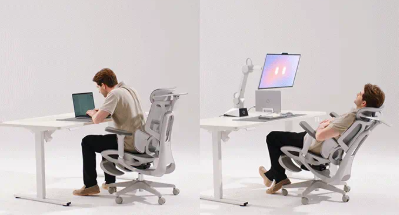
The CyboPal utilizes a 6-DOF robotic arm with a maximum reach of 747mm. Combined with facial recognition and position tracking, it can actively adjust the screen's height, angle, and distance based on user movements such as sitting upright, leaning back, or standing up. The official specifications claim screen repositioning in under 4 seconds after facial tracking.
This feature aims to solve the manual adjustment required by traditional monitor arms, making it particularly suitable for users who frequently switch between sitting and standing postures. However, automatic following isn't inherently more comfortable; if the screen moves too frequently or tracking occasionally misjudges, it could become distracting. Whether it genuinely improves ergonomic experience requires validation through real-world, long-term use.
**27-inch 4K 160Hz: More Than Just a Secondary Screen**
The main display features a 27-inch 3840×2160 resolution with a 160Hz refresh rate. It supports USB-C video input with up to 65W PD power delivery and includes an HDMI 2.1 port. Additionally, a 3.5-inch Pauli interactive sub-screen is integrated at the bottom.
This configuration is designed to cover office work, content creation, and some gaming scenarios, eliminating the need for users to purchase an additional monitor. However, comprehensive test data for the screen panel's color gamut, brightness, and color accuracy is not yet fully available, and a 160Hz refresh rate does not automatically equate to the overall performance level of a professional esports monitor.
**Dual-Camera 3D Spatial Awareness: Robotic Arm Avoids Obstacles**
The CyboPal incorporates dual-camera 3D sensors, joint force sensors, and an IMU. Through spatial modeling and path planning, it identifies desktop obstacles such as cups, keyboards, and cables, establishing safe movement boundaries.
The official specifications also include collision detection, rapid emergency stops, and power-off protection, with a backup power supply to control the robotic arm's descent during unexpected power outages.
This aspect is arguably more critical than the automatic tracking itself. While a standard monitor arm remains stationary, a robot carrying a 27-inch display could potentially collide with people or desktop items. The reliability of its safety mechanisms requires long-term testing across various desktop layouts, rather than relying solely on exhibition demonstrations.
**Pauli Voice Agent: Display Directly Interacts with Computer**
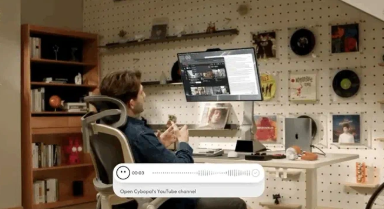
The integrated Pauli AI Agent supports natural language commands, allowing users to directly voice requests such as adjusting the screen, opening applications, organizing windows, or inputting text. It also works with gestures for scrolling, rotating, and adjusting the display.
It is also planned to integrate with software like Gmail, Slack, Chrome, ChatGPT, and Claude Code, with corresponding clients available for Windows, macOS, and Linux.
This positions the CyboPal not just as a moving screen, but as a potential new desktop interaction hub. However, supporting a specific software does not imply unconditional control over all its functions; actual capabilities remain subject to system permissions, client adaptation, and software updates. The cross-application stability of the voice agent currently lacks independent long-term validation.
**RK3588 Independent Computing: Visual Tracking Offloads PC Resources**
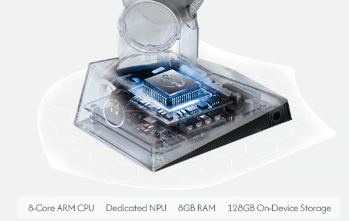
The device features an embedded Rockchip RK3588 octa-core processor, paired with a 6 TOPS NPU, 8GB of RAM, and 128GB of storage. This hardware is dedicated to processing tasks such as facial tracking, gesture recognition, and spatial awareness.
This independent computing architecture is significant, as it means the robot doesn't rely on the host computer for every visual inference task, and it reduces the dependence of basic motion control on cloud connectivity.
However, it is not a high-performance AI PC capable of replacing a workstation. The RK3588 primarily handles the robot's internal computing tasks; daily office work, development, and running large AI models still require an external computer or corresponding services.
**Hardware Privacy Mode: Robotic Arm Stays Still When Camera Is Off**
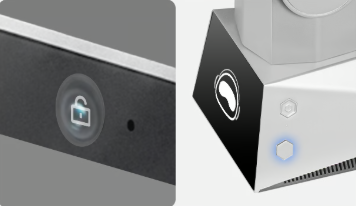
The CyboPal includes a physical Privacy Mode button. When activated, the system halts data collection from the camera and microphone; the display remains functional, but the robotic arm stays stationary. A dedicated hardware indicator light shows the camera's active status.
For a camera-equipped device intended for long-term desktop use, this physical button offers a more intuitive and reassuring way for users to confirm privacy compared to simply disabling tracking within an app. However, while basic visual data is processed locally, this does not mean all Pauli AI tasks are entirely offline. When external AI models, cloud applications, and account authorizations are involved, relevant data still needs to be handled according to the specific software service.
Market Context and Commercial Challenges
The CyboPal ONE is the brand's first consumer-facing product and its debut on Kickstarter. The product was first publicly demonstrated at CES in January 2026 and subsequently showcased at other tech exhibitions. However, there remains a gap between exhibition prototypes and mass-produced commercial units.
The CyboPal effectively bridges three markets: displays, ergonomic monitor arms, and desktop robots. However, there are currently no established independent market statistics for active-tracking robotic displays.
The closest comparable market, monitor arms, can serve as a reference. According to Grand View Research, the global monitor arm market was valued at approximately $1.8 billion in 2026 and is projected to reach $2.1 billion by 2030, with a CAGR of about 4.1% from 2025-2030. Growth is primarily driven by remote work, ergonomic demands, and the proliferation of flexible workspaces.
Traditional competitors are well-established. An Ergotron LX desk mount typically costs between $219-$261, while the Dell UltraSharp U2725QE offers a 27-inch 4K, 120Hz display with Thunderbolt connectivity, officially priced around $850. The combined cost of these two solutions remains significantly lower than CyboPal's $1,599 early bird price.
However, CyboPal isn't primarily competing in the display specifications market; it's vying for the active desktop device segment. While traditional Ergotron arms allow screens to be adjusted, CyboPal aims to take this further by having the screen autonomously determine when adjustments are needed, augmented by voice and AI interaction features.
While it may appeal to high-end desktop enthusiasts, programmers, and tech creators, its commercial viability faces three practical challenges: potential noise and wear from long-term robotic arm movement, whether AI tracking might disrupt daily workflow, and if its high price translates into tangible productivity gains. If most users ultimately fix it in a static position, the 6-DOF robotic arm and AI tracking features could become expensive, infrequently used functionalities.
Does a monitor truly need to actively follow a user? And are users willing to pay a significant premium for automation compared to high-end ergonomic monitor arms costing a few hundred dollars?